
Professional Real Estate Newsletters as a Service
Interesting and engaging ready-made newsletters you can edit as much as you wish. That's how you make them really yours.
Content is king because when consumers are checking email and searching online, they're looking for answers and advice. Content that educates and reminds your contacts of you and your services ends up attracting prospects and contacts to your business.
Newsletters are a tried and true way to get your content and contact information in front of readers regularly. Never worry about topics, writing or designing your own newsletters again. With Ready to Go Newsletters you get 100% complete email and print newsletters that you can start sending right away.
See our real estate newsletters for yourself by starting your 15-day free trial for print and email (Growth subscription) OR check out all our subscription options HERE.
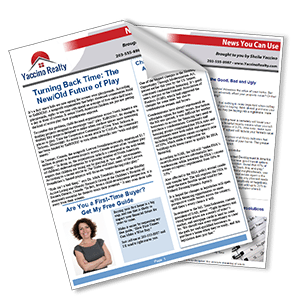
WAY TOO BUSY TO WRITE articles...BUT CAN'T FIND A READY-MADE newsletter THAT you'd be proud to send?
This real estate newsletter will bring you new listings - and give you the respect you deserve.
Each month we provide you with templates for printing and templates for emailing. They're complete with content, but you can change them as much as you want to add local info and personal stories.

Print Format Newsletters
Templates complete with content that you can print and mail yourself (or ask us to print and mail for you). Edit them as much as you wish!
Email Format Newsletters
Ready-made emails you can change as much as you wish and send through our email distribution software.
I am getting a lot of repeat business now and I credit that to the newsletter... I just sold this two million dollar property, I sold these people four places already and I’ve rented a number of their places for them.
Joan Hillegas, Florida
My business has grown. Because of [the newsletter], because people see me, they see my picture on the newsletter every month.
Sandra Caton, California
[Curtis] started brand new, new agent, has never done real estate before. Using newsletter, once a month to a subdivision and within the first three months he had six listings out of that subdivision.
Curtis and Barbie Riley, North Carolina
HOMEOWNERS LOOK FORWARD TO RECEIVING YOUR NEWSLETTER
They'll like what you send - and that means they'll like you too.
Plenty of Templates
We give you 2- and 4-page print format templates, complete with content. And there are versions to put in an envelope and versions to send without one.
Email Newsletter Delivery
We’ve partnered with Active Campaign, the leaders in email newsletter delivery, to give you the best chance of getting your newsletters through spam filters. Send 1,000 emails per month (or more for a small extra fee).
Optional Printing Service
We work with an excellent printer to provide an (optional) printing and mailing service. Ask us for pricing – we can beat most other printers. You can also print and mail the newsletters yourself – it’s up to you.
Response-Generating Devices
You want response from your newsletter, right? That’s why we put in devices that encourage your clients to get in touch.
Email Tracking
Discover who your most active clients are when you download your entire list to see who opened your newsletters, clicked on links or unsubscribed.
Spam Law Compliance
We comply with anti-spam best practices by adding an unsubscribe link and your mailing address to each email. Any emails that have unsubscribed or bounced will be automatically blocked.
Extras to make your newsletters even more effective
We've got a whole range of things to support your newsletter program.
From lead collection to social media to website articles - we've got you covered.
Put Articles on Your Website
We’ll give you some code to paste onto your website that will link to our latest real estate articles. The articles are automatically updated around the 1st of every month, so once it’s set up, there’s nothing else for you to do.
Hundreds of Extra Articles
Your newsletters come complete with content, but we’ve got years’ worth of articles to choose from in our archives. Use them in your newsletter…or even on your website.
Special Bonus Reports
Show your leads and clients that you’re there to help (not just sell!) by offering to send them our valuable special reports. They’ll see that you know your stuff and that you put their interests first. Isn’t that refreshing?
Residential and Commercial
We’ve got you covered, whether you deal with residential or commercial real estate.
Not just boring real estate stuff, but content that will make them go hmmm...
Mixing it up means they'll read it, not trash it.
Think Reader's Digest crossed with a bit of a national newspaper and a little of BuzzFeed. There's something here to make your clients' lives better - something to brighten their day.

Newsletters are easy when you have us to help
We believe in newsletters - and we are here to give you customer support every step along the way.
Help When You Need It
We don’t believe in taking your money and then ignoring you. You can reach customer support by email and phone.
Written by Experts and Journalists
All our writers are in North America. They are either subject-matter experts or journalists. Our articles are edited by a professional editor and then proofread to remove any errors.
It Really Is Ready to Go!
Your newsletter comes personalized with your contact info, logo – even your headshot, if you want it. That means you can send it right away – and then get back to what you do best: selling houses!
No Setup Fee
We don’t believe in charging you money to set up your newsletter. After all, isn’t setting up part of the service?
Try It Free for 30 Days
We don’t believe you should pay until you’re happy with your newsletter. That’s why we insist you try it free for 30 days before paying for your subscription. You will get access to everything during your trial period.
You're 100% in Control
You can send your newsletter when you want to – not on some fixed schedule. Plus, you can send as many or as few newsletters as you want. After all, it’s your newsletter to do what you want with!
See what other real estate agents say about us
Real feedback from our clients
We have noticed that in the week after a newsletter goes out, we always get at least 2 listing appointments.
Kelley Miller
This is the best newsletter I have ever seen. My clients are telling me they are actually reading it! I think that’s because it has lots of content that isn’t just about real estate.
Greg Sparkman
I mail out 2,500 newsletters a month and emails to another 600 clients. I have had great success and my business has improved substantially.
Johnny Brooks
As a result of my newsletters I have gotten 2 sellers to list with me. One directly as a result of receiving my newsletter monthly, and the 2nd sellers were the neighbors of the first happy sellers!
Deona Powell
Let Us Help You Launch Your Real Estate Newsletter Subscription
We know you have a lot on your plate as a realtor, helping your clients rent, sell or purchase properties.
Your schedule is busy with organizing staging, conducting walkthroughs, analyzing the housing market to advise your clients while providing them proper guidance throughout the entire buying, selling or renting process.
Needless to say, you are also busy discovering and engaging new clients. And that is where we can help. When it comes to looking for new leads, we can aid you in this endeavor by helping you to develop a real estate newsletter subscription for prospective and former clients to sign up. That way, you have a regular communication channel ready to go. The most effective newsletters for realtors share your insights and experience in the real estate market, as well as showcase what new properties you have on the market.
Get New Leads with Our Real Estate Newsletter Service
We offer newsletters as a service to you.
That is, we set up the newsletter template, ready the content and then send it over to you prepared for you to make the final touches as you see fit. While our realtors’ newsletters are ready to mail when we send them over to you, we recognize the importance for you to make tweaks here and there prior to sending out the final version to your clients. As a service, we consider them to be the best real estate newsletters on the market. We provide to you what you need to keep, maintain, and build relationships with your clients.
